
Canary
QA a described user flow against a live web app — the agent drives a real browser and hands back a report plus a replay script.
Example runs
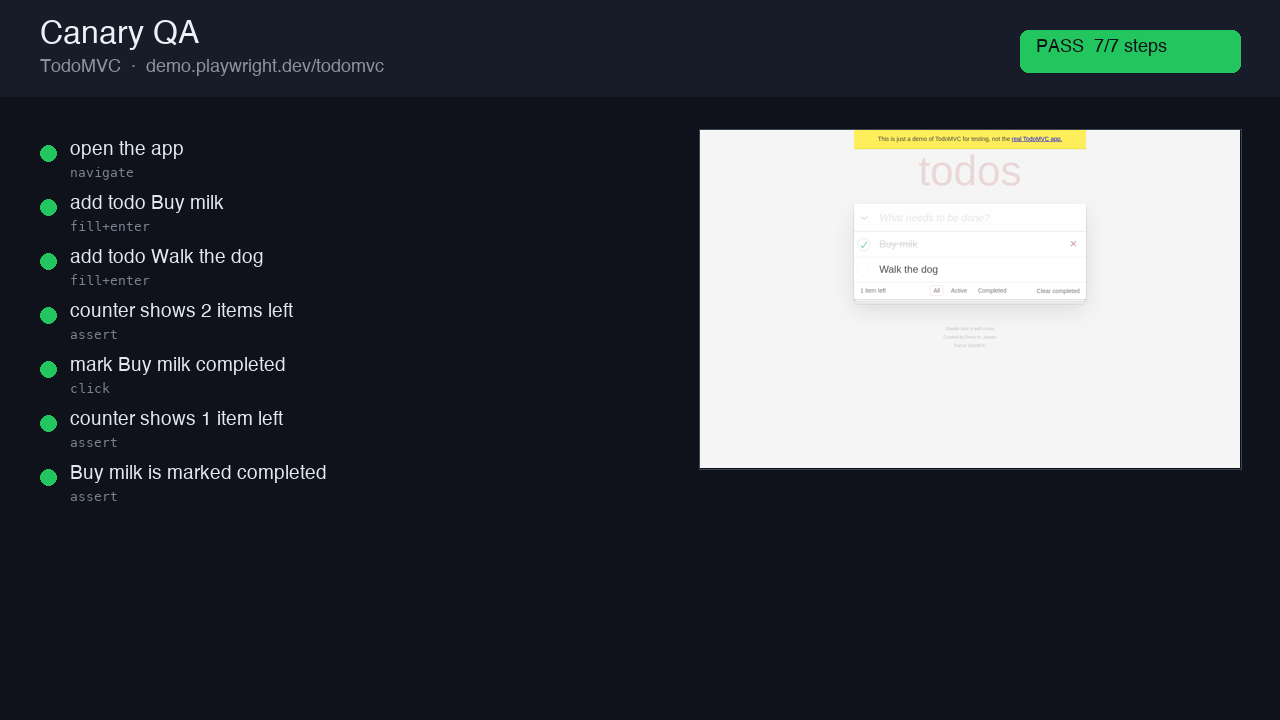
TodoMVC — add & complete a todo
Add two todos and complete one. 7/7 steps pass, with real assertions on the counter (2 → 1) and the completed state. Self-contained report + replay.py.
Inputs
Acceptance checklist
4/4 checks passed.- Setup
- Drive
- Replay
- Report
Runbook
| version | 1.0.0 |
| evaluation | programmatic |
| agent | claude-code |
| model | anthropic/claude-sonnet-4.6 |
| model_provider | openrouter |
| snapshot | prism-playwright |
| primary_outputs | report.html, replay.py |
Canary — Agent-Driven Browser QA — Agent Runbook
Converted, with attribution, from Canary (github.com/wizenheimer/canary, MIT) — a QA harness for coding agents. Canary itself ships a CLI + a QuickJS-WASM Playwright sandbox + a daemon; this runbook re-implements its core idea with plain Playwright so it runs in the Jetty sandbox: describe a flow, the agent drives a real browser, and you get back a self-contained report and a reusable replay script.
EXECUTE THIS RUNBOOK NOW. Drive the browser with tools and write every deliverable to
{{results_dir}}. This is a task to perform, not a document to summarize. Your first action is a tool call (Step 1).
Inputs (already provided)
- Target URL: {{target_url}} — where the flow starts.
- Flow: {{flow}} — the user journey to QA, in plain language, with the checks that must hold (visible text / URL / element state / no console error).
- Credentials (optional): {{credentials}} — e.g.
user=...,pass=...for a login step.
Objective
QA a described user flow against a live web app the way Canary does: the agent drives a real
(headless) browser through small, intent-named steps, and captures evidence at every step
— a screenshot, console messages, and network activity — plus a Playwright trace for the
whole session. Each step that encodes a check is an assertion (visible text, URL, element
state, no console error). The run produces two things Canary insists on having together: a
report you can just read (report.html, self-contained) and the exact reusable script
(replay.py) that reproduces the flow in CI with zero agent cost. Don't make the user choose
between an opaque agent run and hand-written Playwright — hand back both.
REQUIRED OUTPUT FILES (MANDATORY)
You MUST write all of the following to {{results_dir}}. The task is NOT complete until
every file exists and is non-empty. No exceptions.
| File | Description |
|---|---|
{{results_dir}}/report.html | Self-contained QA report: per-step status, the inline screenshot of each step, console errors, a network summary, and the overall verdict. Open it, commit it, send it. |
{{results_dir}}/replay.py | The reusable Playwright script that reproduces the flow exactly — re-runnable in CI with no agent cost. |
{{results_dir}}/steps.json | Structured per-step results: name, action, check, status, screenshot path, console errors. |
{{results_dir}}/trace.zip | The Playwright trace for the whole session (open with playwright show-trace). |
{{results_dir}}/console.log | All browser console messages captured during the run. |
{{results_dir}}/network.har | The network HAR for the session. |
{{results_dir}}/summary.md | Executive summary: flow, verdict, steps passed/failed, the single most important finding. |
{{results_dir}}/validation_report.json | Stage-by-stage validation with overall_passed. See Step 5. |
Screenshots go in {{results_dir}}/screenshots/. If you finish but have not written every
file, go back and write it.
Parameters
| Parameter | Template Variable | Default | Description |
|---|---|---|---|
| Results directory | {{results_dir}} | /app/results | Output directory |
| Target URL | {{target_url}} | (required) | Where the flow starts |
| Flow | {{flow}} | (required) | The plain-language flow + the checks that must hold |
| Credentials | {{credentials}} | (optional) | Login creds if the flow needs them |
| Headless | {{headless}} | true | Run the browser headless (always true on Jetty) |
Dependencies
| Dependency | Type | Required | Description |
|---|---|---|---|
playwright (Python) + Chromium | Runtime | Yes | Pre-installed on the prism-playwright snapshot |
Step 1: Environment Setup
mkdir -p "{{results_dir}}/screenshots"
python -c "import playwright; print('playwright', playwright.__version__)" || python -m pip install --quiet playwright
python -m playwright install chromium 2>/dev/null || true
SITE="{{target_url}}"
[ -n "$SITE" ] && [ "$SITE" != "{{target_url}}" ] || { echo "ERROR: no target_url provided"; exit 1; }
echo "QA target: $SITE"
Step 2: Explore, then Drive the Flow
First observe the target: fetch the page, note the real selectors for the elements the
flow touches (don't guess — read the DOM). Then translate the plain-language {{flow}} into
small, intent-named steps and drive them with the harness below, capturing evidence per step.
Each step is either an action (navigate, click, fill) or an assertion (a check from
the flow). Re-read selectors from the live page if one fails (max 3 retries per step), the way
Canary's explore-and-record loop does.
# Canary-style harness: one screenshot + console + per-step status, plus a full trace.
import json, pathlib, sys
from playwright.sync_api import sync_playwright

RESULTS = "{{results_dir}}"
TARGET  = "{{target_url}}"
pathlib.Path(f"{RESULTS}/screenshots").mkdir(parents=True, exist_ok=True)

console_msgs, steps = [], []

with sync_playwright() as p:
    browser = p.chromium.launch(headless=True)
    context = browser.new_context(record_har_path=f"{RESULTS}/network.har", viewport={"width": 1280, "height": 800})
    context.tracing.start(screenshots=True, snapshots=True, sources=True)
    page = context.new_page()
    page.on("console", lambda m: console_msgs.append({"type": m.type, "text": m.text}))
    page.on("pageerror", lambda e: console_msgs.append({"type": "pageerror", "text": str(e)}))

    def step(name, action, fn, check=None):
        """Run one intent-named step; screenshot + record status. check() -> bool|None."""
        rec = {"name": name, "action": action, "status": "pass", "console_errors": 0, "error": None}
        try:
            fn(page)
            page.wait_for_timeout(400)
            if check is not None:
                rec["status"] = "pass" if check(page) else "fail"
        except Exception as e:
            rec["status"] = "fail"; rec["error"] = str(e)[:300]
        shot = f"{RESULTS}/screenshots/{len(steps)+1:02d}-{name.replace(' ','_')[:40]}.png"
        try: page.screenshot(path=shot, full_page=False)
        except Exception: shot = None
        rec["screenshot"] = (shot.split("/")[-1] if shot else None)
        rec["console_errors"] = sum(1 for m in console_msgs if m["type"] in ("error", "pageerror"))
        steps.append(rec)
        print(f"  [{rec['status'].upper()}] {name}")
        return rec

    # ---- EXAMPLE shape — REPLACE these with the steps for {{flow}} ----
    step("open the app", "navigate", lambda pg: pg.goto(TARGET, wait_until="domcontentloaded"))
    # step("submit the form", "click", lambda pg: pg.click("button[type=submit]"))
    # step("result is visible", "assert", lambda pg: None,
    #      check=lambda pg: pg.get_by_text("Success").is_visible())
    # ------------------------------------------------------------------

    context.tracing.stop(path=f"{RESULTS}/trace.zip")
    context.close(); browser.close()

pathlib.Path(f"{RESULTS}/console.log").write_text("\n".join(f"[{m['type']}] {m['text']}" for m in console_msgs))
pathlib.Path(f"{RESULTS}/steps.json").write_text(json.dumps(steps, indent=2))
passed = sum(1 for s in steps if s["status"] == "pass")
print(f"verdict: {passed}/{len(steps)} steps passed")
Drive real assertions from the flow's checks (visible text, URL, element state). A step with no check is an action; a step that encodes a check is an assertion and must actually verify the page, not just not-throw.
Step 3: Write the Reusable Replay Script
Write {{results_dir}}/replay.py — a standalone Playwright script (no agent, no harness) that
reproduces the exact flow and exits non-zero if any assertion fails. This is the artifact that
runs in CI with zero inference cost.
# replay.py — generated; reproduces the QA flow headless and asserts each check.
from playwright.sync_api import sync_playwright, expect

def main():
    with sync_playwright() as p:
        browser = p.chromium.launch(headless=True)
        page = browser.new_context().new_page()
        page.goto("{{target_url}}")
        # ... the exact steps + expect(...) assertions from Step 2 ...
        browser.close()

if __name__ == "__main__":
    main()
It must mirror Step 2's steps one-to-one. Smoke-test it: python {{results_dir}}/replay.py
should exit 0 on a passing flow.
Step 4: Build report.html
Write a self-contained {{results_dir}}/report.html (no external assets — inline the
screenshots as base64). Include: the flow + target URL, the overall verdict (pass/fail), and
for each step its name, action, status, inline screenshot, and console-error count; plus a
network summary (total requests, failures) and a footer noting trace.zip / replay.py.
import base64, json, pathlib
RESULTS = "{{results_dir}}"
steps = json.load(open(f"{RESULTS}/steps.json"))
def img(name):
p = pathlib.Path(f"{RESULTS}/screenshots/{name}")
if not (name and p.exists()): return ""
b = base64.b64encode(p.read_bytes()).decode()
return f'<img src="data:image/png;base64,{b}" style="max-width:560px;border:1px solid #ddd;border-radius:6px"/>'
passed = sum(1 for s in steps if s["status"]=="pass"); total=len(steps)
verdict = "PASS" if passed==total and total>0 else "FAIL"
rows = "".join(
f'<div style="margin:18px 0;padding:14px;border-left:4px solid {"#22c55e" if s["status"]=="pass" else "#ef4444"};background:#fafafa">'
f'<b>{i+1}. {s["name"]}</b> <span style="color:#666">({s["action"]})</span> '
f'<span style="float:right;color:{"#16a34a" if s["status"]=="pass" else "#dc2626"}">{s["status"].upper()}</span>'
f'<div style="color:#999;font-size:13px">console errors: {s.get("console_errors",0)}{" · "+s["error"] if s.get("error") else ""}</div>'
f'<div style="margin-top:8px">{img(s.get("screenshot"))}</div></div>'
for i,s in enumerate(steps))
html = f"""<!doctype html><meta charset=utf-8><title>Canary QA Report</title>
<body style="font-family:system-ui;max-width:760px;margin:40px auto;color:#111">
<h1>Canary QA Report</h1>
<p><b>Target:</b> {{target_url}}<br><b>Verdict:</b>
<span style="font-weight:700;color:{'#16a34a' if verdict=='PASS' else '#dc2626'}">{verdict}</span>
({passed}/{total} steps)</p>{rows}
<hr><p style="color:#888;font-size:13px">Evidence: trace.zip (playwright show-trace) · network.har · replay.py · console.log</p>
</body>"""
pathlib.Path(f"{RESULTS}/report.html").write_text(html)
print("wrote report.html", verdict)Step 5: Evaluate, Validate & Iterate (max 3 rounds)
| Status | Criteria |
|---|---|
PASS | The flow drove ≥ 2 steps, evidence was captured for each (screenshot + console + the shared trace.zip + network.har), every assertion step ran a real check, report.html and replay.py both exist and are non-empty, and replay.py smoke-runs without import/syntax errors. |
PARTIAL | The flow ran but a non-blocking step failed (e.g. one optional assertion), or replay.py reproduces only part of the flow. Report which step and why. |
FAIL | The browser couldn't drive the flow at all (target unreachable, every step errored), or report.html/replay.py is missing. |
If a step failed on a brittle selector, re-read the live DOM and fix the selector (max 3
rounds), then re-run. Write validation_report.json:
{
  "version": "1.0.0", "run_date": "<ISO>",
  "parameters": { "target_url": "{{target_url}}" },
  "stages": [
    { "name": "setup",   "passed": true, "message": "playwright + chromium ready" },
    { "name": "drive",   "passed": true, "message": "N steps driven, evidence captured" },
    { "name": "replay",  "passed": true, "message": "replay.py written and smoke-runs" },
    { "name": "report",  "passed": true, "message": "report.html + all artifacts written" }
  ],
  "results": { "steps_total": 0, "steps_passed": 0, "verdict": "PASS|FAIL" },
  "overall_passed": true
}
overall_passed is true iff every stage passed and report.html + replay.py exist.
Step 6: Write Executive Summary
Write {{results_dir}}/summary.md:
# Canary QA — Results

## Overview
- **Date**: <ISO>  ·  **Target**: {{target_url}}
- **Flow**: <one-line restatement>
- **Verdict**: PASS|FAIL  ·  **Steps**: <passed>/<total>

## Steps
| # | Step | Action | Status | Console errors |
|---|------|--------|--------|----------------|

## Most important finding
<one sentence: the failing assertion, or "flow passed clean — N steps, 0 console errors">

## Artifacts
- report.html (self-contained) · replay.py (CI-ready) · trace.zip · network.har · console.log
Final Checklist (MANDATORY — do not skip)
Verification Script
echo "=== FINAL OUTPUT VERIFICATION ==="
RESULTS_DIR="{{results_dir}}"
for f in "$RESULTS_DIR/report.html" "$RESULTS_DIR/replay.py" "$RESULTS_DIR/steps.json" \
         "$RESULTS_DIR/trace.zip" "$RESULTS_DIR/console.log" "$RESULTS_DIR/network.har" \
         "$RESULTS_DIR/summary.md" "$RESULTS_DIR/validation_report.json"; do
  [ -s "$f" ] && echo "PASS: $f ($(wc -c < "$f") bytes)" || echo "FAIL: $f is missing or empty"
done
SHOTS=$(ls "$RESULTS_DIR"/screenshots/*.png 2>/dev/null | wc -l | tr -d ' ')
[ "$SHOTS" -ge 2 ] && echo "PASS: $SHOTS step screenshots" || echo "FAIL: too few screenshots ($SHOTS)"
python3 -c "import ast; ast.parse(open('$RESULTS_DIR/replay.py').read()); print('PASS: replay.py parses')" || echo "FAIL: replay.py has a syntax error"
echo "=== VERIFICATION COMPLETE ==="
Checklist
- The flow drove ≥ 2 intent-named steps against the live target
- Every step has a screenshot; console + network + the shared
trace.zipwere captured - Each assertion step ran a real check (visible text / URL / state), not just no-throw
-
report.htmlis self-contained (screenshots inlined, opens with no external assets) -
replay.pyreproduces the flow and parses/smoke-runs cleanly -
summary.mdstates the verdict and the single most important finding -
validation_report.jsonhasstages,results,overall_passed
If ANY item fails, go back and fix it. Do NOT finish until all items pass.
Tips
- Observe before you drive. Read the live DOM for real selectors; don't guess. Canary's edge is exploring the actual page, not replaying a brittle pre-written script.
- An assertion must assert. A step that "checks" something has to verify the page (text visible, URL changed, element enabled) — a step that merely doesn't throw is an action, not a check. Console errors are a check too: a clean flow has zero.
- Hand back both. The whole point is a readable
report.htmlAND the exactreplay.py. The report is for a human; the script runs in CI with zero agent cost on replay. - Small, intent-named steps. "log in", "add to cart", "cart shows 1" — not "click #btn-3". Intent names make the report and the trace readable.
- Headless, deterministic targets. Public test apps (TodoMVC, the-internet, saucedemo) are ideal: stable selectors, no auth walls, designed to be driven.