Conference abstract scraper
Scrape a conference's accepted abstracts into structured JSON, pairing CrossRef metadata with full text from the meeting program.
Example runs
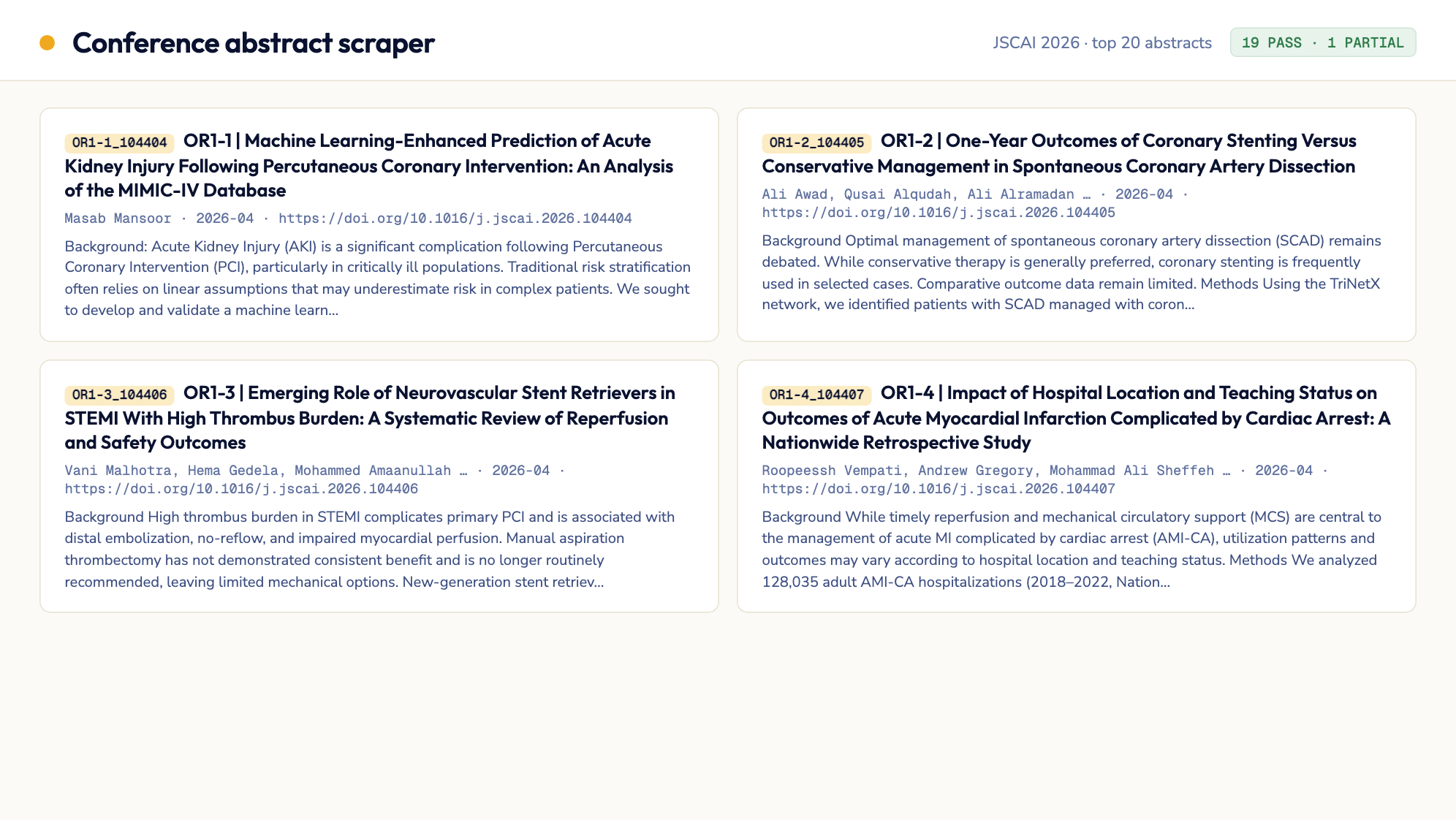
JSCAI 2026 issue, top 20 abstracts
20 cardiovascular-intervention conference abstracts sourced from CrossRef (metadata/ordering) + the SCAI Confex program (full text) directly, 19 PASS / 1 PARTIAL, 0 duplicates.
Inputs
Acceptance checklist
6/6 checks passed.- Setup
- Link discovery
- Extraction
- Evaluation
- Completeness check
- Report generation
Published outputs
abstracts.jsonRunbook
| version | 1.1.3 |
| evaluation | programmatic |
| agent | claude-code |
| model | anthropic/claude-sonnet-5 |
| model_provider | openrouter |
| snapshot | prism-playwright |
| primary_outputs | abstracts.json |
Conference Abstract Scraper — Agent Runbook
Objective
Produce clean, structured, searchable records for a conference's accepted posters/abstracts (starting with SCAI/JSCAI), combining two sources by design:
- CrossRef (the journal's DOI registry) for canonical metadata — DOI, authors, publication date, and the issue's page-number ordering (used as a stand-in for table-of-contents order).
- The conference's own Confex meeting program (e.g.
scai.confex.com/.../meetingapp.cgi) for the actual abstract full text — journal publisher sites (jscai.org, sciencedirect.com, etc.) are frequently behind a WAF/Cloudflare IP-level block that has no per-page workaround, while the conference's own program site is normally open and carries equivalent (pre-publication) abstract text.
The agent queries CrossRef to discover and order the abstracts, then opens the conference's Confex program directly with Playwright, matches each CrossRef-discovered title against the program's session listings, and extracts the full abstract body from the matched Confex record. The output is a structured JSON file covering the first N abstracts, suitable for downstream search, key-finding extraction, and clustering. Every entry discovered via CrossRef must be captured exactly once — no skipped or merged entries.
REQUIRED OUTPUT FILES (MANDATORY)
You MUST write all of the following files to {{results_dir}}.
The task is NOT complete until every file exists and is non-empty. No exceptions.
| File | Description |
|---|---|
{{results_dir}}/abstracts.json | Array of abstract objects, one per scraped entry. Each object includes: abstract_id, title, conference, doi_or_url, authors (list), publication_date, full_text (formatted body), source_page_url, confex_paper_id (the conference program's internal ID for the matched record, for traceability) |
{{results_dir}}/summary.md | Executive summary with run metadata, results breakdown, and recommendations |
{{results_dir}}/validation_report.json | Structured validation results with stages, results, and overall_passed |
If you finish your analysis but have not written all files, go back and write them before stopping.
Parameters
The Template Variable column holds this run's actual inputs — it overrides the Default column. Use {{crossref_volume_issue}} and {{confex_program_url}} exactly as given, even when they name a different year or volume than the defaults (the defaults describe SCAI 2026; any other SCAI year, or another conference with a CrossRef-indexed supplement and a Confex program, is selected purely by changing these two values). Never "correct" a parameter toward the default, and never mix years between the CrossRef issue and the Confex program.
| Parameter | Template Variable | Default | Description |
|---|---|---|---|
| Results directory | {{results_dir}} | /app/results (Jetty) / ./results (local) | Output directory for all results |
| CrossRef issue ISSN | {{crossref_issn}} | 2772-9303 | The journal's ISSN, used to query the CrossRef REST API for the target issue's DOIs, titles, authors, and publication dates |
| CrossRef volume/issue | {{crossref_volume_issue}} | volume 5, issue 4 | The specific volume/issue to pull from CrossRef — narrows the query to the target conference supplement |
| Confex program URL | {{confex_program_url}} | https://scai.confex.com/scai/2026/meetingapp.cgi | The conference's own Confex meeting program — the primary full-text source. Find the current year's URL from the conference's public program page if it has moved |
| Max abstracts | {{max_abstracts}} | 20 | Number of abstracts to process, in CrossRef page-number order |
Dependencies
| Dependency | Type | Required | Description |
|---|---|---|---|
| Playwright (Chromium) | Sandbox tool | Yes | Pre-installed via the prism-playwright snapshot; used to render the Confex program (a client-rendered Backbone.js SPA) and navigate into each matched abstract's record |
| CrossRef REST API | External API | Yes | api.crossref.org — no API key required. Used for abstract discovery, ordering, and canonical metadata (DOI, authors, publication date) |
beautifulsoup4 / lxml | Python package | Yes | HTML parsing for extracting abstract body text once a Confex record is rendered |
requests | Python package | Yes | Querying the CrossRef REST API |
Step 1: Environment Setup
# Install dependencies
pip install beautifulsoup4 lxml playwright requests
python -m playwright install chromium

# Create output directories
mkdir -p {{results_dir}}
Verify Playwright's Chromium browser launches successfully, and that api.crossref.org is reachable, before proceeding (no external credentials are required for this runbook).
Step 2: Discover Abstracts & Metadata via CrossRef
Query the CrossRef REST API directly (no browser needed for this step) to discover and order the target issue's abstracts:
GET https://api.crossref.org/journals/{{crossref_issn}}/works?filter=from-print-pub-date:...&rows=1000Filter the returned works to exactly {{crossref_volume_issue}} using each work's volume and issue fields (CrossRef returns them as strings, e.g. "volume": "4", "issue": "5") — page through the journal's works with rows=1000&offset=… (or cursor=*) until the filtered set stops growing, rather than guessing a publication-date window. Confirm the filtered set is non-empty before continuing; if it is empty, the volume/issue was mistyped — stop and report it in validation_report.json rather than silently switching to another issue.
- For each returned work, record:
title,DOI,authors(from theauthorarray, in listed order),published(print or online date), andpage(the article/page number CrossRef reports for the issue — this stands in for true table-of-contents order since these supplement issues publish in page-number order). Keep only the conference abstracts. A supplement issue can bundle regular journal content (original research, case reports, editorials) together with the meeting's abstracts; only the abstracts are indexed in the Confex program. Conference abstracts are recognisable by the session code prefixed to their CrossRef title —OR1-1 | …,B-18 | …,P-204 | …(a short letter/number code, a hyphen, a number, then a pipe). Keep works whose title matches^[A-Za-z]{1,4}\d*-\d+\s*\|and drop the rest, recording the dropped count invalidation_report.json'snotes. If no title carries a session code, fall back to all works for the issue and say so in the notes. - Sort all returned works by
pageascending. This is the canonical ordering — do not reorder based on any other field. - Take the first
{{max_abstracts}}entries in this sorted order. Do not skip, reorder, or de-duplicate at this stage — record every entry exactly as returned, even if titles look similar (near-duplicate titles are common for multi-part poster series and must NOT be merged). - Persist this list of CrossRef records to
{{results_dir}}/_discovered_links.jsonas an intermediate checkpoint, so partial progress survives if a later step fails.
If a work in the expected page-number sequence is simply absent from CrossRef's results (e.g. a gap between consecutive page numbers), it was likely withdrawn before publication — note the gap in validation_report.json's notes field (see Step 7) rather than treating it as a scraping failure.
Step 3: Fetch Full Text Directly from Confex
CrossRef records carry metadata but not full abstract text. Open {{confex_program_url}} with Playwright — this is a client-rendered (Backbone.js) single-page app, so wait for the program's session/topic listings to fully render before parsing.
For each CrossRef record from Step 2, in order:
- Locate the matching record in the Confex program: browse into the relevant topic/session category (e.g. "Coronary", "Oral Abstracts" — session names vary by conference; check the program's top-level navigation) and search its rendered listing for a title match.
- Match by normalized title (lowercase, strip leading session codes like
OR1-1 |, collapse whitespace/punctuation) rather than exact string equality — Confex's pre-publication titles commonly differ from the published CrossRef title in minor punctuation, casing, or truncation. - Once matched, open that record's own view within the program and extract:
- The full abstract body text, preserving structural fidelity to the original (section headers such as Background/Methods/Results/Conclusion if present; paragraph breaks; special characters and subscripts/superscripts as plain-text equivalents, e.g.
10^-3) - The program's own internal identifier for the record (used as
confex_paper_id, for traceability — this ID is assigned by Confex's navigation, not guessable from a static URL pattern, so read it from the record you actually opened rather than constructing it)
- The full abstract body text, preserving structural fidelity to the original (section headers such as Background/Methods/Results/Conclusion if present; paragraph breaks; special characters and subscripts/superscripts as plain-text equivalents, e.g.
- Merge the Confex full text +
confex_paper_idwith the corresponding CrossRef record's metadata (DOI→doi_or_url,authors,published→publication_date) into one output object. Setabstract_idfrom the published session/poster code if visible on either source (e.g.OR1-1), else from the Confex or CrossRef identifier. Setsource_page_urlto the Confex record's own URL if the program exposes a stable one for the current session, else to the CrossRef DOI link. - If a title cannot be matched in the Confex program at all, still keep the CrossRef metadata in the output record with
full_text: nulland statusFAIL(see Step 4) — do not drop the record or fabricate text. - If a field is genuinely absent from both sources, record it as
nullrather than guessing. - Record the result as one object in the running
abstracts.jsonarray, tagged with its evaluation status (see Step 4).
Process each abstract independently — a failure matching or extracting one abstract must not stop processing of the remaining abstracts.
Step 4: Evaluate Outputs
For each of the {{max_abstracts}} abstracts, assign an evaluation status:
| Status | Criteria |
|---|---|
PASS | CrossRef metadata complete (doi_or_url, authors, publication_date all non-null) and the title was matched in the Confex program with non-empty, apparently-complete full_text |
PARTIAL | CrossRef metadata complete, but the Confex match yielded truncated/short full_text (e.g. only an introductory sentence), or the match was low-confidence (title match required more than light normalization) |
FAIL | The title could not be matched in the Confex program at all (full_text: null), or a CrossRef metadata field is missing with no way to recover it, or the entry could not be distinguished from a neighboring entry (risk of merge) |
Additionally, run a completeness check across the whole batch:
- Count of entries in
abstracts.jsonmust equal{{max_abstracts}}(or the total available from CrossRef if fewer than{{max_abstracts}}exist for the requested volume/issue) - No two entries may share the same
abstract_idordoi_or_url(duplicate/merge detection) - Every entry from the Step 2 discovery list must appear exactly once in the final output
Record this batch-level completeness check as its own line item in validation_report.json's stages.
Step 5: Iterate on Errors (max 3 rounds)
If any abstracts received FAIL or PARTIAL status, or the completeness check failed:
- Read the specific error message or failure reason
- Apply the targeted fix from the Common Fixes table below
- Re-fetch the failed/partial item through Step 3
- Re-evaluate with Step 4 criteria
- Repeat up to 3 times total
After 3 rounds, keep the best result obtained and flag remaining failures clearly in the summary — do not silently drop a failed entry from abstracts.json; keep it with its status and whatever fields were recoverable.
Common Fixes
| Issue | Fix |
|---|---|
| Confex program content is empty/truncated on first parse | It's a client-rendered SPA — wait for network idle or a specific content selector (not a fixed sleep) after navigating, before parsing |
| Title match against Confex fails despite the abstract clearly being in the program | Normalize both titles harder: strip session codes (OR1-1 |), punctuation, and casing; fall back to matching on a distinctive substring (e.g. first 40-50 characters) rather than requiring full equality |
| Abstract text is behind an extra click-through within the Confex record (e.g. "View full abstract") | Look for and click expand/show-more controls before extracting full_text |
Rate limiting or slow responses from api.crossref.org or the Confex program | Add a 1-2s delay between requests/navigations; retry with exponential backoff (up to 3 attempts) on timeout |
| Confex full text is only a short excerpt (e.g. an introductory sentence with no Methods/Results) | This can happen when the program lists a different (abridged) version than expected — keep what's available, mark the entry PARTIAL, and note it in summary.md rather than treating it as a match failure |
| A CrossRef page-number gap suggests a missing entry | Confirm it isn't a numbering artifact (check the surrounding entries' pages are otherwise contiguous) before concluding the article was withdrawn; note either conclusion in validation_report.json |
Step 6: Write Executive Summary
Write {{results_dir}}/summary.md with the following structure:
# Conference Abstract Scraper — Results

## Overview
- **Date**: {run date}
- **CrossRef ISSN / volume-issue**: {{crossref_issn}} / {{crossref_volume_issue}}
- **Confex program**: {{confex_program_url}}
- **Abstracts requested**: {{max_abstracts}}
- **Abstracts processed**: {count}

## Results Summary

| Status | Count | % |
|--------|-------|---|
| PASS | ... | ... |
| PARTIAL | ... | ... |
| FAIL | ... | ... |

## Completeness Check
- Entries discovered via CrossRef: {count}
- Entries matched in Confex program: {count}
- Entries in final output: {count}
- Duplicate/merge conflicts detected: {count}

## Sample Outputs

### Successes
{2-3 representative successful abstract extractions, showing metadata + text snippet}

### Failures
{2-3 representative failures with root cause}

## Recommendations
- {What to fix or investigate}
- {Patterns observed}

## Limitations
- {What could not be evaluated}
- {Caveats}
Step 7: Write Validation Report
Write {{results_dir}}/validation_report.json:
{
  "version": "1.0.0",
  "run_date": "2026-01-01T00:00:00Z",
  "parameters": {
    "crossref_issn": "{{crossref_issn}}",
    "crossref_volume_issue": "{{crossref_volume_issue}}",
    "confex_program_url": "{{confex_program_url}}",
    "max_abstracts": "{{max_abstracts}}"
  },
  "stages": [
    { "name": "setup", "passed": true, "message": "Environment ready" },
    { "name": "crossref_discovery", "passed": true, "message": "Discovered N works from CrossRef, sorted by page number" },
    { "name": "confex_matching_and_extraction", "passed": true, "message": "Matched and extracted full text for N abstracts from the Confex program" },
    { "name": "evaluation", "passed": true, "message": "All abstracts evaluated" },
    { "name": "completeness_check", "passed": true, "message": "N entries in, N entries out, 0 duplicates" },
    { "name": "report_generation", "passed": true, "message": "All output files written" }
  ],
  "results": {
    "pass": 0,
    "partial": 0,
    "fail": 0
  },
  "overall_passed": true,
  "output_files": [
    "{{results_dir}}/abstracts.json",
    "{{results_dir}}/summary.md",
    "{{results_dir}}/validation_report.json"
  ],
  "notes": {
    "page_number_gaps": ["List any expected page numbers absent from CrossRef results, and whether they appear withdrawn"],
    "unmatched_titles": ["List any CrossRef titles that could not be matched in the Confex program"],
    "partial_entries": ["List any entry ids downgraded to PARTIAL/FAIL and the reason"]
  }
}
Step 8: Final Checklist (MANDATORY — do not skip)
Verification Script
echo "=== FINAL OUTPUT VERIFICATION ==="
RESULTS_DIR="{{results_dir}}"
for f in "$RESULTS_DIR/abstracts.json" "$RESULTS_DIR/summary.md" "$RESULTS_DIR/validation_report.json"; do
  if [ ! -s "$f" ]; then
    echo "FAIL: $f is missing or empty"
  else
    echo "PASS: $f ($(wc -c < "$f") bytes)"
  fi
done
Checklist
-
abstracts.jsonexists, is valid JSON, and contains exactly{{max_abstracts}}entries (or fewer only if CrossRef has fewer available for the requested volume/issue) - Every entry in
abstracts.jsonhas non-emptyfull_textand a uniqueabstract_id/doi_or_url - No entry from the Step 2 discovery list is missing from
abstracts.json, and no two entries were merged into one -
summary.mdexists and follows the template from Step 6 -
validation_report.jsonexists withstages,results, andoverall_passed - Verification script printed PASS for all files
- Only the required output files (plus the
_discovered_links.jsoncheckpoint from Step 2) were written to{{results_dir}}— any other scratch/debug files (test fetches, screenshots, alternate-source dumps) were cleaned up or written to a working directory outside{{results_dir}}instead
If ANY item fails, go back and fix it. Do NOT finish until all items pass.
Tips
- Session-coded titles are the abstracts. In JSCAI supplement issues, the first entries by page number can be regular articles (vol. 4 issue 5 — SCAI 2025 — opens with case reports and sub-analyses that are only discussed in aggregate at the meeting); taking "the first N by page" without the session-code filter selects titles that are not in Confex at all and every match fails. The filter in Step 2 is what makes a different year work.
- Parameters win over defaults. The defaults in the Parameters table describe the SCAI 2026 supplement; a run for SCAI 2025 sets
{{crossref_volume_issue}}tovolume 4, issue 5and{{confex_program_url}}to thescai/2025program. Both are legitimate, current inputs — do not treat a year that differs from the default as a mistake. - Why Confex, not the journal site, by design: Elsevier/ScienceDirect-family publisher domains (jscai.org included) commonly return a Cloudflare-level block (Error 1000) to sandboxed IPs regardless of per-page handling — this is an access-layer block with no request-level workaround. The conference's own Confex program is normally open and, for a conference-supplement issue, carries equivalent (pre-publication) abstract text. Going there directly avoids the block entirely rather than working around it after the fact.
- CrossRef's
worksendpoint returnsauthor,published-print/published-online, andpagedirectly in JSON — no HTML parsing needed for metadata. Use these fields as-is rather than re-deriving them from Confex, which typically doesn't expose DOIs at all. - Confex meeting apps (
*.confex.com) are client-rendered Backbone.js SPAs — the served HTML is a shell until JS runs. Use Playwright'swait_for_selectororwait_for_load_state("networkidle")after navigating, never a fixed sleep; a fixed sleep is a common cause of empty/truncatedfull_text. - Confex's internal record identifiers (used here as
confex_paper_id) are assigned by the program's own navigation state, not a guessable numeric URL path — read the ID from the record you actually opened via title match, don't try to construct it from the CrossRef DOI or page number. - Confex titles are pre-publication and frequently differ from the CrossRef-published title in minor punctuation, casing, or an added/dropped session-code prefix (e.g.
OR1-1 |). Normalize both sides before comparing, and prefer a substring/fuzzy match over exact equality. - When two entries have very similar titles (e.g. multi-part poster series like "Part 1"/"Part 2"), treat them as fully distinct entries — verify each has its own unique DOI (from CrossRef) before assuming a duplicate.
- A gap in CrossRef's page-number sequence (e.g. page 104413 then 104415, skipping 104414) usually means that article was withdrawn before publication, not a scraping miss — note it rather than treating it as a failure to fix.