
PDF processing
Extract text, tables, and key fields from PDFs into clean, structured JSON.
Example runs
Research-paper tables → JSON
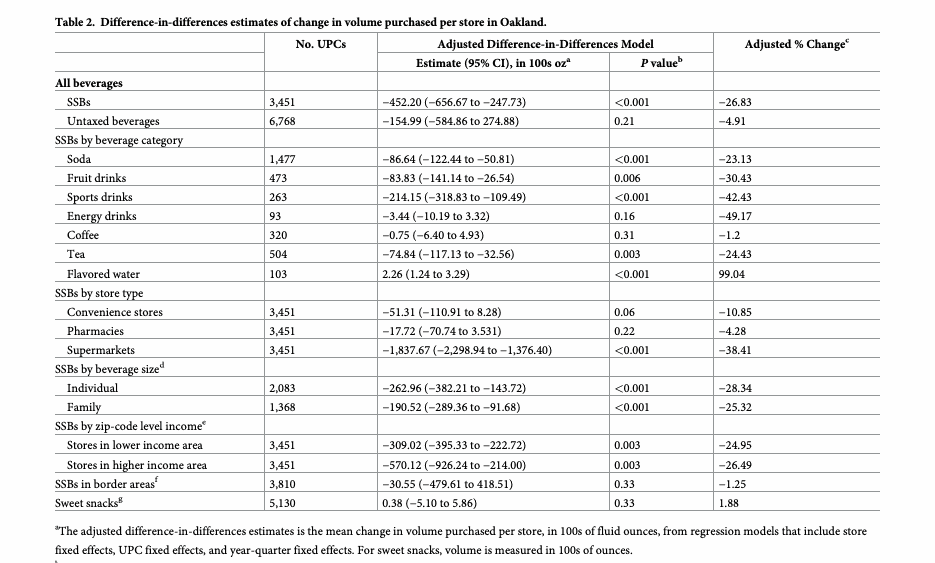
Extract every table from a 20-page PLOS Medicine article into one strictly-valid JSON file (empty cells null, word spacing recovered).
Inputs
Acceptance checklist
7/7 checks passed.- Setup
- Validation
- Extract text
- Extract tables
- JSON valid
- Output PDF
- Output check
Runbook
| version | 1.2.1 |
| evaluation | programmatic |
| agent | claude-code |
| model | anthropic/claude-sonnet-4.6 |
| model_provider | openrouter |
| snapshot | python312-uv |
| primary_outputs | extracted_tables.json, output.pdf, extracted_text.txt |
PDF Processing Guide — Agent Runbook
Objective
Process PDF files using Python libraries and command-line tools to perform operations such as reading, extracting text and tables, merging, splitting, rotating pages, adding watermarks, creating new PDFs, filling forms, encrypting/decrypting, extracting images, and performing OCR on scanned documents. This runbook covers the full lifecycle of PDF manipulation: from initial environment setup and dependency installation through execution of the requested operation to final verification of outputs. Use this runbook whenever the user references a .pdf file or requests any PDF-related transformation. A worked end-to-end example — extracting every table from a 20-page PubMed research article into a clean JSON file — ships in examples/pubmed-tables-to-json/. For advanced features, JavaScript libraries, and detailed examples, see REFERENCE.md; for form-filling workflows, see FORMS.md.
Requested Operation (READ FIRST)
Operation: {{operation}}
Perform only this operation. If it is phrased in natural language, map it to the
nearest operation in the Parameters table (e.g. "stamp every page CONFIDENTIAL" →
watermark; "pull the tables into JSON" → extract-tables; "pull out the figures" →
extract-images). Run only the matching Step 3 sub-section and produce only
that operation's deliverables (see below). Do not run other operations — e.g. a
watermark request must NOT also emit extracted_text.txt or extracted_tables.*.
If no operation is given, default to extract-tables.
REQUIRED OUTPUT FILES
Always write these two to /app/results (every operation):
| File | Description |
|---|---|
/app/results/summary.md | Executive summary: operation performed, input files, output files, any warnings |
/app/results/validation_report.json | Structured validation results with stages, results, and overall_passed |
Then write only the deliverable(s) for the requested operation:
| Operation | Deliverable(s) in /app/results |
|---|---|
extract-text, ocr | extracted_text.txt |
extract-tables | extracted_tables.json (strictly-valid JSON — empty cells null, never NaN) and extracted_tables.xlsx |
merge, rotate, watermark, create, encrypt, decrypt, fill-form | output.pdf |
split | page_1.pdf, page_2.pdf, … |
extract-images | images/ directory containing one or more image files |
The task is NOT complete until summary.md, validation_report.json, and the
operation's deliverable(s) all exist and are non-empty. Mark any inapplicable check as
skipped in validation_report.json.
Parameters
| Parameter | Default | Description |
|---|---|---|
| Results directory | /app/results | Output directory for all results |
| Input PDF(s) | (required) | One or more input PDF file paths. Uploaded files land in /app/assets/ |
| Operation | (required) | One of: merge, split, extract-text, extract-tables, rotate, watermark, create, encrypt, decrypt, ocr, extract-images, fill-form — or a natural-language description (e.g. "extract the tables into JSON"). The agent will map this to the nearest operation. For table extraction, append "as JSON" or "as Excel" to control output format (default: both JSON + Excel). |
| Output filename | output.pdf | Name for the primary output file |
| Password | (optional) | Password for encrypt/decrypt operations |
| Rotation degrees | 90 | Degrees to rotate pages (for rotate operation) |
| Page range | (optional) | Page range for split/extract operations (e.g., 1-5) |
Dependencies
| Dependency | Type | Required | Description |
|---|---|---|---|
pypdf | Python package | Yes | Basic PDF operations: merge, split, rotate, metadata, password protection |
pdfplumber | Python package | Yes | Text and table extraction with layout preservation |
reportlab | Python package | Yes | PDF creation using canvas or Platypus document templates |
pytesseract | Python package | Conditional | OCR on scanned PDFs (required for ocr operation) |
pdf2image | Python package | Conditional | Convert PDF pages to images for OCR (required for ocr operation) |
pandas | Python package | Conditional | Advanced table export to Excel (required for extract-tables operation) |
openpyxl | Python package | Conditional | Excel writer backend for pandas (required for extract-tables operation) |
poppler-utils | System package | Conditional | Provides pdftotext and pdfimages CLI tools |
qpdf | System package | Conditional | CLI-based merge, split, rotate, decrypt |
pdftk | System package | Optional | Alternative CLI merge/split/rotate tool |
tesseract-ocr | System package | Conditional | OCR engine (required for ocr operation) |
Step 1: Environment Setup
Install all Python dependencies and verify CLI tools are available.
echo "=== Installing Python dependencies ==="
pip install pypdf pdfplumber reportlab

# Install optional dependencies based on operation
OPERATION="${OPERATION:-extract-text}"
if [[ "$OPERATION" == "ocr" ]]; then
  pip install pytesseract pdf2image
fi
if [[ "$OPERATION" == "extract-tables" ]]; then
  pip install pandas openpyxl
fi

echo "=== Checking CLI tools ==="
command -v pdftotext >/dev/null 2>&1 && echo "pdftotext: OK" || echo "pdftotext: not found (install poppler-utils)"
command -v qpdf      >/dev/null 2>&1 && echo "qpdf: OK"      || echo "qpdf: not found"
command -v pdftk     >/dev/null 2>&1 && echo "pdftk: OK"     || echo "pdftk: not found (optional)"

echo "=== Creating output directory ==="
mkdir -p /app/results
Verify Python imports succeed before proceeding:
from pypdf import PdfReader, PdfWriter
import pdfplumber
from reportlab.lib.pagesizes import letter
print("All core dependencies imported successfully")
Step 2: Validate Inputs
Verify that the input PDF(s) exist and are readable before running any operation.
import pathlib, sys, glob as _glob

# Input files are uploaded to /app/assets/ — check there first, then /app/results/
_candidates = _glob.glob("/app/assets/*.pdf") + _glob.glob("/app/results/*.pdf")
input_files = _candidates if _candidates else ["/app/results/input.pdf"]

for f in input_files:
    p = pathlib.Path(f)
    if not p.exists():
        print(f"ERROR: Input file not found: {f}")
        sys.exit(1)
    if p.stat().st_size == 0:
        print(f"ERROR: Input file is empty: {f}")
        sys.exit(1)
    print(f"OK: {f} ({p.stat().st_size} bytes)")

print("All input files validated.")
Step 3: Execute PDF Operation
Choose the appropriate code block for the requested operation. Run the relevant section only.
3a: Merge PDFs
from pypdf import PdfWriter, PdfReader
import pathlib

input_files = ["doc1.pdf", "doc2.pdf", "doc3.pdf"]  # Replace with actual paths
output_path = "/app/results/output.pdf"

writer = PdfWriter()
for pdf_file in input_files:
    reader = PdfReader(pdf_file)
    for page in reader.pages:
        writer.add_page(page)

with open(output_path, "wb") as output:
    writer.write(output)
print(f"Merged {len(input_files)} PDFs → {output_path}")
3b: Split PDF
from pypdf import PdfReader, PdfWriter
import pathlib

input_path = "/app/results/input.pdf"
output_dir = pathlib.Path("/app/results")

reader = PdfReader(input_path)
output_files = []
for i, page in enumerate(reader.pages):
    writer = PdfWriter()
    writer.add_page(page)
    out_path = output_dir / f"page_{i+1}.pdf"
    with open(out_path, "wb") as output:
        writer.write(output)
    output_files.append(str(out_path))

print(f"Split into {len(output_files)} pages: {output_files}")
3c: Extract Text
import pdfplumber, pathlib, glob as _glob

_candidates = _glob.glob("/app/assets/*.pdf") + _glob.glob("/app/results/*.pdf")
input_path = _candidates[0] if _candidates else "/app/results/input.pdf"
output_path = "/app/results/extracted_text.txt"

text_parts = []
with pdfplumber.open(input_path) as pdf:
    for i, page in enumerate(pdf.pages):
        # x_tolerance=1 recovers word spacing on tightly-kerned PDFs.
        t = page.extract_text(x_tolerance=1)
        if t:
            text_parts.append(f"=== Page {i+1} ===\n{t}")

full_text = "\n\n".join(text_parts)
pathlib.Path(output_path).write_text(full_text)
print(f"Extracted {len(full_text)} characters → {output_path}")
For scanned PDFs, use OCR instead (see Step 3g).
3d: Extract Tables
import pdfplumber, pandas as pd, pathlib, json, glob as _glob, math

# Input files are uploaded to /app/assets/ — resolve the actual path
_candidates = _glob.glob("/app/assets/*.pdf") + _glob.glob("/app/results/*.pdf")
input_path = _candidates[0] if _candidates else "/app/results/input.pdf"
output_xlsx = "/app/results/extracted_tables.xlsx"
output_json = "/app/results/extracted_tables.json"

# Tighter text tolerances recover word spacing that the default (x_tolerance=3)
# drops on tightly-kerned PDFs (e.g. "Numberofstores" -> "Number of stores").
TABLE_SETTINGS = {"text_x_tolerance": 1, "text_y_tolerance": 1}

def _clean(v):
    """Normalize a cell to a JSON-safe value: blanks and NaN become None."""
    if v is None:
        return None
    if isinstance(v, float) and math.isnan(v):
        return None
    s = str(v).strip()
    return s if s else None

all_tables = []
with pdfplumber.open(input_path) as pdf:
    for i, page in enumerate(pdf.pages):
        for table in page.extract_tables(table_settings=TABLE_SETTINGS):
            if not table:
                continue
            df = pd.DataFrame(table[1:], columns=table[0])
            # Drop columns and rows that are entirely blank (merged-cell noise).
            df = df.replace(r"^\s*$", pd.NA, regex=True)
            df = df.dropna(axis=1, how="all").dropna(axis=0, how="all")
            if df.empty:
                continue
            df.insert(0, "source_page", i + 1)
            all_tables.append(df)

if all_tables:
    combined = pd.concat(all_tables, ignore_index=True)
    combined.to_excel(output_xlsx, index=False)

    # Build a strictly-valid JSON structure: one object per table, NaN/blank -> null.
    json_out = []
    page_counts: dict = {}
    for df in all_tables:
        page = int(df["source_page"].iloc[0])
        tidx = page_counts.get(page, 0)
        page_counts[page] = tidx + 1
        body = df.drop(columns=["source_page"])
        headers = [str(c) if (c is not None and not pd.isna(c)) else f"col_{n}"
                   for n, c in enumerate(body.columns)]
        body.columns = headers
        records = [{k: _clean(v) for k, v in row.items()}
                   for row in body.to_dict(orient="records")]
        json_out.append({
            "source_page": page,
            "table_index": tidx,
            "headers": headers,
            "rows": records,
            "row_count": len(records),
        })
    # allow_nan=False guarantees strictly-valid JSON (no NaN/Infinity tokens) —
    # the most common failure mode of pandas -> json table exports.
    pathlib.Path(output_json).write_text(
        json.dumps(json_out, indent=2, ensure_ascii=False, allow_nan=False))
    print(f"Extracted {len(all_tables)} table(s) with {len(combined)} rows → {output_xlsx} + {output_json}")
else:
    pathlib.Path(output_xlsx).write_text("")
    pathlib.Path(output_json).write_text("[]")
    print("No tables found in the PDF.")
3e: Rotate Pages
from pypdf import PdfReader, PdfWriter

input_path = "/app/results/input.pdf"
output_path = "/app/results/output.pdf"
degrees = 90  # Replace with desired rotation

reader = PdfReader(input_path)
writer = PdfWriter()
for page in reader.pages:
    page.rotate(degrees)
    writer.add_page(page)

with open(output_path, "wb") as out:
    writer.write(out)
print(f"Rotated all pages by {degrees}° → {output_path}")
3f: Add Watermark
Generates the watermark in-code (no pre-existing watermark.pdf needed) and stamps it
on every page, sized per-page so it works on any page geometry.
from pypdf import PdfReader, PdfWriter
from reportlab.pdfgen import canvas
import io, glob as _glob

_candidates = _glob.glob("/app/assets/*.pdf") + _glob.glob("/app/results/*.pdf")
input_path = _candidates[0] if _candidates else "/app/results/input.pdf"
output_path = "/app/results/output.pdf"
text = "CONFIDENTIAL"  # Replace with the requested watermark text

reader = PdfReader(input_path)
writer = PdfWriter()
for page in reader.pages:
    w, h = float(page.mediabox.width), float(page.mediabox.height)
    buf = io.BytesIO()
    c = canvas.Canvas(buf, pagesize=(w, h))
    c.saveState()
    c.translate(w / 2, h / 2)
    c.rotate(45)
    c.setFont("Helvetica-Bold", max(64, int(w / 6)))
    try:
        c.setFillAlpha(0.30)            # clearly legible but still non-destructive
    except Exception:
        pass
    c.setFillColorRGB(0.75, 0.10, 0.10)  # muted red reads at any zoom
    c.drawCentredString(0, 0, text)
    c.restoreState()
    c.save()
    buf.seek(0)
    page.merge_page(PdfReader(buf).pages[0])
    writer.add_page(page)

with open(output_path, "wb") as out:
    writer.write(out)
print(f"Watermarked {len(reader.pages)} pages with '{text}' → {output_path}")
3g: OCR Scanned PDFs
# Requires: pip install pytesseract pdf2image
# Requires: apt-get install tesseract-ocr poppler-utils
import pytesseract, pathlib
from pdf2image import convert_from_path

input_path = "/app/results/input.pdf"
output_path = "/app/results/extracted_text.txt"

images = convert_from_path(input_path)
text_parts = []
for i, image in enumerate(images):
    page_text = pytesseract.image_to_string(image)
    text_parts.append(f"=== Page {i+1} ===\n{page_text}")

full_text = "\n\n".join(text_parts)
pathlib.Path(output_path).write_text(full_text)
print(f"OCR complete: {len(images)} pages, {len(full_text)} chars → {output_path}")
3h: Password Protection / Encryption
from pypdf import PdfReader, PdfWriter

input_path = "/app/results/input.pdf"
output_path = "/app/results/output.pdf"
user_password = "userpassword"    # Replace
owner_password = "ownerpassword"  # Replace

reader = PdfReader(input_path)
writer = PdfWriter()
for page in reader.pages:
    writer.add_page(page)

writer.encrypt(user_password, owner_password)
with open(output_path, "wb") as out:
    writer.write(out)
print(f"Encrypted → {output_path}")
3i: Decrypt / Remove Password
# Using qpdf
qpdf --password=mypassword --decrypt /app/results/input.pdf /app/results/output.pdf
echo "Decrypted → /app/results/output.pdf"
3j: Extract Images
# Using pdfimages (poppler-utils)
mkdir -p /app/results/images
pdfimages -j /app/results/input.pdf /app/results/images/img
echo "Images extracted to /app/results/images/"
ls /app/results/images/
3k: Create New PDF
from reportlab.lib.pagesizes import letter
from reportlab.platypus import SimpleDocTemplate, Paragraph, Spacer, PageBreak
from reportlab.lib.styles import getSampleStyleSheet

output_path = "/app/results/output.pdf"

doc = SimpleDocTemplate(output_path, pagesize=letter)
styles = getSampleStyleSheet()
story = []

story.append(Paragraph("Document Title", styles['Title']))
story.append(Spacer(1, 12))
story.append(Paragraph("Document body content goes here.", styles['Normal']))

# IMPORTANT: Never use Unicode subscript/superscript chars (₀¹²) in ReportLab.
# Use XML tags instead: <sub>2</sub> or <super>2</super> in Paragraph objects.

doc.build(story)
print(f"Created PDF → {output_path}")
Step 4: Iterate on Errors (max 3 rounds)
If Step 3 raised an exception or produced an empty/corrupt output file:
- Check the error message for the specific failure class
- Apply the relevant fix from the Common Fixes table below
- Re-run the affected Step 3 sub-section
- Repeat up to 3 rounds total
After 3 rounds, if the output is still invalid, record the failure in summary.md and validation_report.json with overall_passed: false and stop.
Common Fixes
| Issue | Fix |
|---|---|
FileNotFoundError on input PDF | Verify the input path; check /app/assets/ for the uploaded file |
PdfReadError: EOF marker not found | The PDF may be corrupt or truncated; try with qpdf: qpdf --check input.pdf |
PasswordError on encrypted PDF | Pass the correct password to PdfReader("file.pdf", password="...") |
| Empty extracted text (not scanned) | Try pdfplumber instead of pypdf for text extraction |
| Empty extracted text (scanned PDF) | Install tesseract and use OCR workflow (Step 3g) |
Words run together (e.g. Numberofstores) | Lower the text tolerance: extract_text(x_tolerance=1) / text_x_tolerance in table settings |
Interleaved characters on dense forms (e.g. OUNRDDEERR for "ORDER"/"UNDER") | The source overlaps two text runs on one baseline; no x/y_tolerance fixes it. Body text is unaffected; if the form layer matters, OCR those pages (Step 3g) |
ValueError: Out of range float values are not JSON compliant | A NaN reached json.dumps; map blanks/NaN to None first (the _clean helper in 3d) and pass allow_nan=False |
| ReportLab renders black boxes for subscripts | Replace Unicode sub/superscript chars with <sub> / <super> XML tags |
qpdf or pdftotext not found | Install system packages: apt-get install -y qpdf poppler-utils pdftk |
| Tables extracted with None values | Rows with merged cells return None; drop all-blank rows/cols (the dropna calls in 3d) |
Step 5: Validate Outputs
Verify that all expected output files exist and are non-empty. For JSON outputs, also verify they parse as strictly-valid JSON.
import pathlib, json, sys

results_dir = pathlib.Path("/app/results")
operation = "extract-text"  # Replace with actual operation

# Define expected outputs per operation
EXPECTED = {
    "merge":          ["output.pdf"],
    "split":          [],  # Dynamic; check for page_*.pdf files
    "extract-text":   ["extracted_text.txt"],
    "extract-tables": ["extracted_tables.xlsx", "extracted_tables.json"],
    "rotate":         ["output.pdf"],
    "watermark":      ["output.pdf"],
    "create":         ["output.pdf"],
    "encrypt":        ["output.pdf"],
    "decrypt":        ["output.pdf"],
    "ocr":            ["extracted_text.txt"],
    "extract-images": [],  # Check images/ subdir
    "fill-form":      ["output.pdf"],
}

stages = []
overall_passed = True

for fname in EXPECTED.get(operation, []):
    fpath = results_dir / fname
    passed = fpath.exists() and fpath.stat().st_size > 0
    # Strict-JSON check for any .json deliverable.
    if passed and fname.endswith(".json"):
        try:
            json.loads(fpath.read_text())
        except (ValueError, json.JSONDecodeError) as e:
            passed = False
            stages.append({"name": f"json_valid:{fname}", "passed": False, "message": str(e)})
    stages.append({"name": f"output:{fname}", "passed": passed,
                   "message": f"{fpath} ({fpath.stat().st_size if fpath.exists() else 'MISSING'} bytes)"})
    if not passed:
        overall_passed = False

# Always check summary.md and validation_report.json
for fname in ["summary.md", "validation_report.json"]:
    fpath = results_dir / fname
    passed = fpath.exists() and fpath.stat().st_size > 0
    stages.append({"name": f"output:{fname}", "passed": passed,
                   "message": str(fpath)})

print(json.dumps({"stages": stages, "overall_passed": overall_passed}, indent=2))
Step 6: Write Executive Summary
Write /app/results/summary.md with a concise record of the run.
import pathlib, datetime

content = f"""# PDF Processing — Run Summary

## Operation
- **Operation**: <replace with actual operation>
- **Input**: <replace with input file(s)>
- **Output**: <replace with output file(s)>
- **Date**: {datetime.datetime.utcnow().isoformat()}Z

## Validation

| Check | Status | Notes |
|-------|--------|-------|
| Input file exists | ✓ PASS | |
| Operation completed | ✓ PASS | |
| Output file non-empty | ✓ PASS | |
| summary.md written | ✓ PASS | |
| validation_report.json written | ✓ PASS | |

## Issues / Notes
- None

## Provenance
- Skill: pdf by anthropics/skills
- Origin: https://skills.sh/anthropics/skills/pdf
- Imported by: skill-to-runbook-converter v1.0.0
"""
pathlib.Path("/app/results/summary.md").write_text(content)
print("summary.md written")
Step 7: Write Validation Report
Write /app/results/validation_report.json.
import json, pathlib, datetime

report = {
    "version": "1.1.0",
    "run_date": datetime.datetime.utcnow().isoformat() + "Z",
    "parameters": {
        "skill_url": "https://skills.sh/anthropics/skills/pdf",
        "operation": "<replace>",
        "input_files": ["<replace>"],
    },
    "stages": [
        {"name": "setup",        "passed": True, "message": "Dependencies installed"},
        {"name": "validation",   "passed": True, "message": "Input files verified"},
        {"name": "execution",    "passed": True, "message": "Operation completed"},
        {"name": "output_check", "passed": True, "message": "Output files non-empty"},
    ],
    "results": {"pass": 4, "partial": 0, "fail": 0},
    "overall_passed": True,
    "output_files": [
        "/app/results/output.pdf",
        "/app/results/summary.md",
        "/app/results/validation_report.json",
    ]
}

pathlib.Path("/app/results/validation_report.json").write_text(json.dumps(report, indent=2))
print("validation_report.json written")
Step 8: Final Checklist (MANDATORY — do not skip)
Verification Script
echo "=== FINAL OUTPUT VERIFICATION ==="
RESULTS_DIR="/app/results"

# Check mandatory files
for f in \
  "$RESULTS_DIR/summary.md" \
  "$RESULTS_DIR/validation_report.json"; do
  if [ ! -s "$f" ]; then
    echo "FAIL: $f is missing or empty"
  else
    echo "PASS: $f ($(wc -c < "$f") bytes)"
  fi
done

# Check operation-specific output (adjust as needed)
OPERATION="${OPERATION:-extract-text}"
case "$OPERATION" in
  merge|rotate|watermark|create|encrypt|decrypt|fill-form)
    OUT="$RESULTS_DIR/output.pdf"
    [ -s "$OUT" ] && echo "PASS: $OUT ($(wc -c < "$OUT") bytes)" || echo "FAIL: $OUT missing or empty"
    ;;
  extract-text|ocr)
    OUT="$RESULTS_DIR/extracted_text.txt"
    [ -s "$OUT" ] && echo "PASS: $OUT ($(wc -c < "$OUT") bytes)" || echo "FAIL: $OUT missing or empty"
    ;;
  extract-tables)
    for OUT in "$RESULTS_DIR/extracted_tables.xlsx" "$RESULTS_DIR/extracted_tables.json"; do
      [ -s "$OUT" ] && echo "PASS: $OUT ($(wc -c < "$OUT") bytes)" || echo "FAIL: $OUT missing or empty"
    done
    python3 -c "import json,sys; json.load(open('$RESULTS_DIR/extracted_tables.json')); print('PASS: extracted_tables.json is valid JSON')" 2>/dev/null || echo "FAIL: extracted_tables.json is not valid JSON"
    ;;
  split)
    COUNT=$(ls "$RESULTS_DIR"/page_*.pdf 2>/dev/null | wc -l)
    [ "$COUNT" -gt 0 ] && echo "PASS: $COUNT split page files found" || echo "FAIL: no split page files found"
    ;;
  extract-images)
    COUNT=$(ls "$RESULTS_DIR"/images/ 2>/dev/null | wc -l)
    [ "$COUNT" -gt 0 ] && echo "PASS: $COUNT image files extracted" || echo "FAIL: no images extracted"
    ;;
esac

echo "=== VERIFICATION COMPLETE ==="
Checklist
- Input PDF(s) existed and were readable
- Correct operation was selected and executed without unhandled exceptions
- Primary output file is non-empty and valid (not corrupt)
-
extracted_text.txtexists for text/OCR operations -
extracted_tables.xlsxandextracted_tables.jsonboth exist for table-extraction operations -
extracted_tables.jsonparses as strictly-valid JSON (noNaN/Infinitytokens) -
summary.mddocuments the operation, inputs, outputs, and any warnings -
validation_report.jsonhasoverall_passed: true(or documents why it isfalse) - Verification script above printed PASS for every applicable line
- No credentials or sensitive data were written to output files
If ANY item fails, return to the relevant step and fix it. Do NOT finish until all applicable items pass.
Tips
- pypdf vs pdfplumber for text extraction: Use
pdfplumberfor higher-fidelity text and table extraction (preserves layout). Usepypdffor structural operations (merge, split, rotate, encrypt). - Words run together in extracted text: Tightly-kerned PDFs (common in academic typesetting) embed text with sub-default spacing. Lower
x_tolerance(e.g.extract_text(x_tolerance=1), ortext_x_toleranceinextract_tablessettings) to recover word boundaries. - Valid JSON from pandas:
df.to_dict()keepsNaNfor empty cells, andjson.dumpswrites a bareNaNtoken that most strict parsers reject. Always map blanks/NaN toNoneand passallow_nan=Falseso the deliverable is portable JSON. - Scanned PDFs: If
page.extract_text()returns empty or garbage, the PDF is likely scanned. Switch to the OCR workflow (Step 3g) withpytesseractandpdf2image. - ReportLab subscripts/superscripts: Never use Unicode sub/superscript characters (₀¹²³) in ReportLab. Use
<sub>and<super>XML tags insideParagraphobjects. For canvas-drawn text, manually adjust font size and baseline offset instead. - Large PDFs: For PDFs with hundreds of pages, process in batches or use
qpdfCLI tools which are more memory-efficient than pure-Python approaches. - Password-protected PDFs: Pass
password=toPdfReaderconstructor; useqpdf --decryptfor command-line decryption. - Form filling: This runbook covers standard PDF operations. For form filling (AcroForms), follow the dedicated instructions in FORMS.md.
- CLI tools as fallback: If Python libraries fail on a malformed PDF,
qpdfandpdftotext(poppler-utils) are often more robust and worth trying as fallbacks.