Policy-based text redaction
Redact sensitive spans from each record in a dataset according to its own policy, then score the result against a five-point rubric.
Example runs
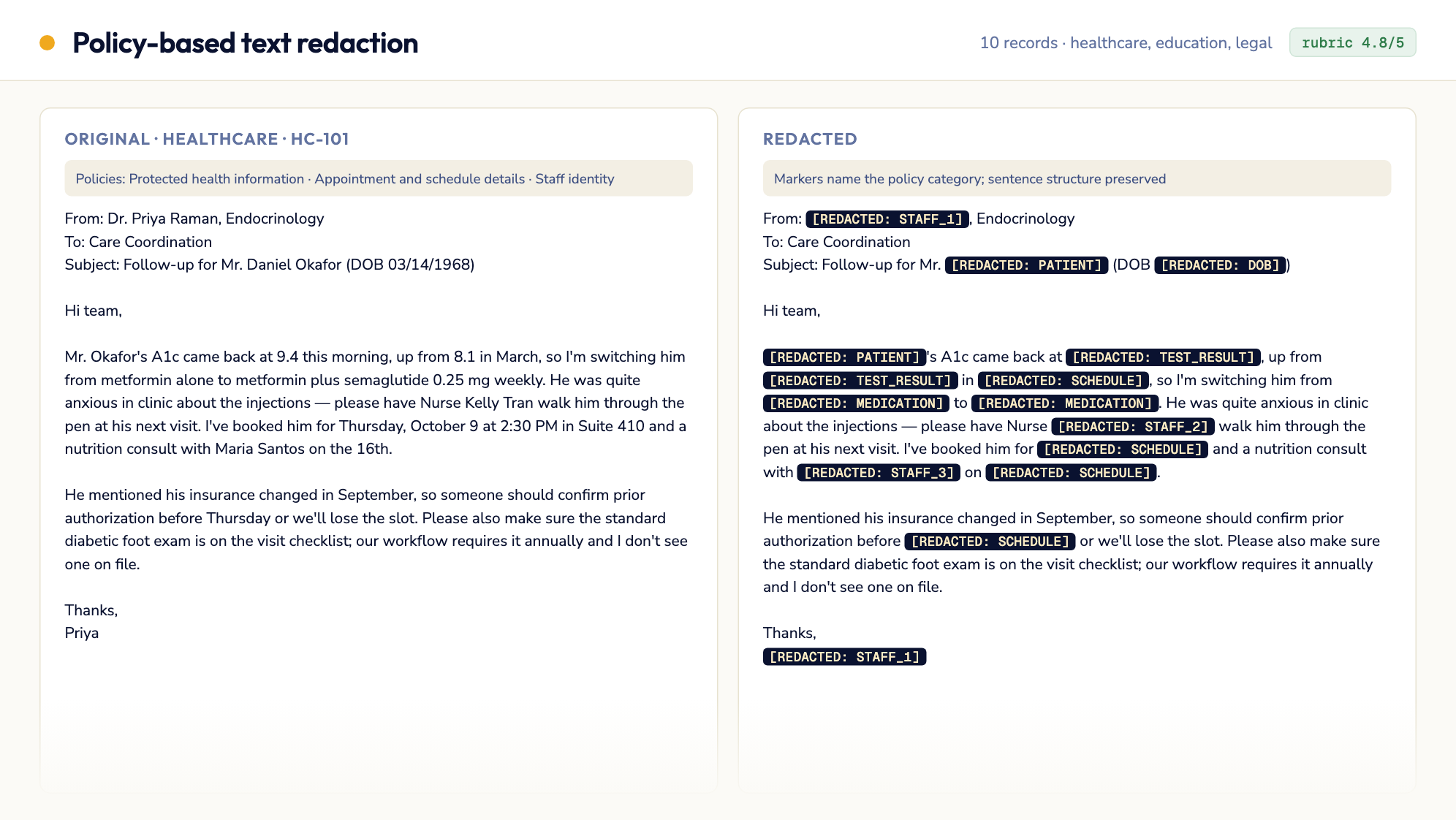
10 professional-domain records (healthcare, education, legal)
Clinic emails, a discharge summary, school counselor notes, and privileged legal memos — each redacted against its own policy list. Scored 4.8/5 in a single pass: 5/5 on policy compliance, context preservation, marker consistency and readability, 4/5 on precision (two legal memos redact whole strategy sentences by design). Numbered markers keep who-said-what-to-whom intact.
Inputs
Acceptance checklist
5/5 checks passed.- Setup
- Input parsing
- Redaction
- Evaluation
- Report generation
Published outputs
redacted_dataset.jsonRunbook
| version | 1.0.3 |
| evaluation | rubric |
| agent | claude-code |
| model | anthropic/claude-sonnet-5 |
| model_provider | openrouter |
| snapshot | python312-uv |
| primary_outputs | redacted_dataset.json |
Policy-Based Text Redaction — Agent Runbook
Objective
Given a dataset of records — each with a domain, a set of redaction policies, and a raw text — produce a redacted version of every text that complies with its own policies. The input is a JSON file of records, each with id, domain, policy (bulleted policy statements), policy_ids, and text. For each record, redact only the spans of text that a stated policy requires protecting (names, dates, schedules, financial details, internal discussions, etc.), replacing them with clear placeholder markers. The output must balance two competing failure modes: under-redaction (sensitive info leaks through) and over-redaction (blacking out so much that the text loses its meaning and usefulness). Produce a new JSON file containing every original field plus the redacted text for each record. A worked end-to-end example — 20 records spanning government, corporation, and individual domains, scored 4.73/5 against the rubric below — ships in examples/sample20-run/.
REQUIRED OUTPUT FILES (MANDATORY)
You MUST write all of the following files to {{results_dir}}.
The task is NOT complete until every file exists and is non-empty. No exceptions.
| File | Description |
|---|---|
{{results_dir}}/redacted_dataset.json | JSON array with all input records; each record has every original field (id, domain, policy, policy_ids, text) plus a new redacted_text field |
{{results_dir}}/summary.md | Executive summary with scores, feedback, and recommendations |
{{results_dir}}/validation_report.json | Structured validation results with rubric scores and overall_passed |
If you finish your work but have not written all files, go back and write them before stopping.
Parameters
| Parameter | Template Variable | Default | Description |
|---|---|---|---|
| Results directory | {{results_dir}} | /app/results (Jetty) / ./results (local) | Output directory for all results |
| Input dataset | {{input_file}} | (required) | Path to the source JSON dataset of records to redact. Uploaded files land in /app/assets/ |
| Redaction marker style | {{redaction_marker}} | [REDACTED: {category}] | Format for replacing sensitive spans (e.g. [REDACTED: PERSON], [REDACTED: DATE]) — category should describe what was removed |
Dependencies
| Dependency | Type | Required | Description |
|---|---|---|---|
Python standard library (json) | Python package | Yes | Reading/writing the dataset — no external packages needed |
Step 1: Environment Setup
# No external packages required — pure Python stdlib (json) is sufficient

# Create output directory
mkdir -p {{results_dir}}
Verify {{input_file}} exists and is valid JSON before proceeding. If that path is absent, look in /app/assets/ — files uploaded through the API are stored as <run_id>.NN.json — and use the single JSON file found there (record the actual path in validation_report.json). Load it and confirm it parses as a list of records with the expected fields (id, domain, policy, policy_ids, text).
Step 2: Parse Input
Load {{input_file}} and for each record extract:
id,domain— carry through unchanged to the outputpolicy— the full bulleted policy text; parse it into individual policy statements (each bullet describes one category of sensitive info to protect, e.g. "Explicitly stated personal plan", "Reveals confidential schedule details")policy_ids— short labels for each policy statement, useful for tagging which policy triggered each redactiontext— the raw text to redact
For each record, map each policy statement to the concrete spans in text it applies to (e.g. a policy about "confidential schedule details" applies to meeting times, dates, and locations mentioned in the text).
Step 3: Redact Each Record
For each record, produce redacted_text by replacing only the spans that violate a stated policy with a marker in the {{redaction_marker}} style (e.g. [REDACTED: PERSON_NAME], [REDACTED: SCHEDULE], [REDACTED: FINANCIAL]). Use a category label that reflects which policy triggered the redaction.
Requirements:
- Redact only spans that a stated policy in that record's
policyfield actually covers — do not invent extra redactions for categories not mentioned in the policy. - Preserve sentence structure, greetings, sign-offs, and non-sensitive connective text so the redacted document still reads coherently (e.g. keep "Let's do this on [REDACTED: DATE] at [REDACTED: LOCATION]." rather than blacking out the whole sentence).
- Do not over-redact: avoid replacing entire paragraphs or emails wholesale when only a name, date, or figure within them is sensitive.
- Do not under-redact: every span that plausibly identifies a person, schedule, financial detail, or other item named in the policy must be replaced, even if it appears multiple times in different forms (e.g. "Sarah Wesner" and "Sarah"). This includes exact date/timestamp strings (e.g.
09/18/2000 08:31 AM) — an email header timestamp is just as identifying as a relative day name like "Thursday" and must not be left exposed just because it's numeric or appears in a header line rather than the message body. - Apply markers consistently — the same entity should get the same category marker each time it's redacted within a record. When a record names 2+ distinct people, organizations, or parties, number the markers per entity in order of first appearance (e.g.
[REDACTED: PERSON_1],[REDACTED: PERSON_2]) instead of reusing one generic label for everyone — this preserves who-said-what-to-whom without re-identifying anyone, and is what the Marker Consistency criterion in Step 4 rewards. - If you automate redaction with a script, prefer plain literal substring replacement (e.g. Python
str.replace) over hand-rolled regex substitution for the common case. Regex requires manually escaping every literal parenthesis, period, and irregular whitespace, and debugging those escape mismatches across records can consume the entire time budget before you ever reach the rubric evaluation in Step 4. Reach for regex only when a span genuinely varies (e.g. matching any 4-digit year), and verify each such pattern against the actual source text (not a re-typed approximation) before wiring it into the full script — whitespace and capitalization mismatches between what you assume the text says and what it actually contains are a common silent-failure source.
Time-budget checkpoint: if you're still debugging redaction logic past roughly the first third of your available time, stop refining the script and move on with the best working version you have. A complete run through Steps 4–8 with imperfect redactions beats a perfect script that never reaches the rubric, summary, or validation report — all three are mandatory outputs regardless of how Step 3 goes.
Build the output record as all original fields plus redacted_text, and append it to the output array. Save the full array to {{results_dir}}/redacted_dataset.json.
Step 4: Evaluate Against Rubric
For each record, score redacted_text against each criterion on a 1-5 scale, then average across all records to get the overall per-criterion and overall scores.
Rubric
| # | Criterion | 5 (Excellent) | 3 (Acceptable) | 1 (Poor) |
|---|---|---|---|---|
| 1 | Policy Compliance (no leaks) | Every span covered by a stated policy is fully redacted; no sensitive info identifiable, even indirectly (e.g. via context clues) | Most flagged info is redacted; one minor, low-risk detail slips through | Multiple policy-flagged details (names, dates, financial figures, etc.) remain fully readable |
| 2 | Context Preservation | Non-sensitive content, narrative flow, and document structure (greetings, signatures, unrelated topics) are fully intact and readable | Some non-sensitive content is unnecessarily removed or garbled, but the gist is still clear | Large portions of non-sensitive, safe content are blacked out or the text is unreadable as a result |
| 3 | Redaction Precision (no over-redaction) | Only the specific words/phrases that are sensitive are replaced — surrounding sentence structure stays intact | A few redactions are broader than necessary (e.g. a whole sentence redacted for one sensitive word) | Wholesale blackout of entire paragraphs/messages when only isolated details were sensitive |
| 4 | Marker Consistency & Clarity | Every redaction uses a clear, consistent category marker (e.g. [REDACTED: DATE]); the same entity always gets the same marker | Markers are present but inconsistent (same entity redacted with different labels) or occasionally vague | Redactions are unlabeled blackouts or markers are missing/inconsistent throughout |
| 5 | Readability of Redacted Text | The redacted text reads as a coherent, grammatically sound document despite the redactions | Redacted text is understandable but choppy or awkward in places | Redacted text is fragmented, confusing, or unreadable |
Pass threshold: overall average >= 4.0, no individual criterion below 3.
Record your scores and reasoning for each criterion, aggregated across all records. Also flag any individual record that scores notably below the others so it can be targeted in iteration.
Step 5: Iterate on Weak Criteria (max 3 rounds)
If the rubric score is below the pass threshold:
- Identify the lowest-scoring criteria (below 3 first, then below 4), and the specific records dragging down the average
- Consult the Common Fixes table below for targeted improvements
- Re-redact only the affected records — change only what addresses the weak criteria, don't touch records that already scored well
- Re-score with Step 4 rubric
- Repeat up to 3 times total
After 3 rounds, keep the best-scoring version and note remaining weaknesses in the summary.
Common Fixes
| Weak Criterion | Common Issue | Fix |
|---|---|---|
| Policy Compliance | An entity is redacted once but the same person/detail reappears later under a different form (first name only, nickname, pronoun-adjacent context) and is missed | Search the full text for all mentions/aliases of each redacted entity, not just the first occurrence |
| Context Preservation | Entire email headers or non-sensitive sign-offs got redacted along with a nearby sensitive detail | Narrow the redaction span to just the sensitive token; keep headers/signatures unless they themselves are policy-flagged |
| Redaction Precision (over-redaction) | A whole sentence or paragraph was blacked out because it contained one sensitive word | Re-scope the redaction to the minimal span (the specific name, date, or figure) rather than the containing sentence |
| Marker Consistency | Same entity gets different labels across occurrences (e.g. [REDACTED] in one place, [REDACTED: NAME] elsewhere) | Build a per-record entity-to-marker map before redacting so every occurrence of the same entity uses the same label |
| Readability | Redactions leave dangling grammar (e.g. "I'm free on [REDACTED]" reads oddly if punctuation/spacing was stripped) | After redacting, re-read the sentence in place of the original span to confirm it still parses grammatically |
Step 6: Write Executive Summary
Write {{results_dir}}/summary.md with the following structure:
# Policy-Based Text Redaction — Results

## Overview
- **Date**: {run date}
- **Input**: {input dataset filename and record count/domains}
- **Iterations**: {how many rounds of refinement}

## Rubric Scores

| # | Criterion | Score | Notes |
|---|-----------|-------|-------|
| 1 | Policy Compliance | X/5 | {Brief justification} |
| 2 | Context Preservation | X/5 | {Brief justification} |
| 3 | Redaction Precision | X/5 | {Brief justification} |
| 4 | Marker Consistency | X/5 | {Brief justification} |
| 5 | Readability | X/5 | {Brief justification} |
| | **Overall** | **X.X/5** | |

## Output Description
{2-3 sentences describing the redacted dataset and the general redaction approach used}

## Per-Record Notes
{Flag any records that scored notably lower than the rest, and why}

## Iteration History
{What changed in each round and why}

## Recommendations
- {What could be improved with more iteration}
- {Upstream changes that would improve quality, e.g. clearer policy wording}

## Limitations
- {What the rubric does not capture}
- {Subjective aspects that may need human review}
Step 7: Write Validation Report
Write {{results_dir}}/validation_report.json. Use exactly this shape — every entry in stages has the keys name (string), passed (JSON boolean, not a status word) and message (string); the dashboard that renders runs reads those three keys and shows a report with any other shape (e.g. stage/status: "completed") as zero checks passed. Keep the five stage names below; do not rename or restructure them.
{
  "version": "1.0.0",
  "run_date": "2026-01-01T00:00:00Z",
  "parameters": {
    "input_file": "<replace with actual input filename>",
    "redaction_marker": "[REDACTED: {category}]"
  },
  "stages": [
    { "name": "setup", "passed": true, "message": "Environment ready" },
    { "name": "input_parsing", "passed": true, "message": "Records parsed successfully" },
    { "name": "redaction", "passed": true, "message": "redacted_dataset.json generated for all records" },
    { "name": "evaluation", "passed": true, "message": "Rubric score: X.X/5" },
    { "name": "report_generation", "passed": true, "message": "All output files written" }
  ],
  "rubric_scores": {
    "policy_compliance": { "score": 5, "notes": "..." },
    "context_preservation": { "score": 4, "notes": "..." },
    "redaction_precision": { "score": 4, "notes": "..." },
    "marker_consistency": { "score": 5, "notes": "..." },
    "readability": { "score": 4, "notes": "..." }
  },
  "overall_score": 4.4,
  "pass_threshold": 4.0,
  "iterations": 1,
  "overall_passed": true,
  "record_count": 20,
  "output_files": [
    "{{results_dir}}/redacted_dataset.json",
    "{{results_dir}}/summary.md",
    "{{results_dir}}/validation_report.json"
  ]
}
Step 8: Final Checklist (MANDATORY — do not skip)
Verification Script
echo "=== FINAL OUTPUT VERIFICATION ==="
RESULTS_DIR="{{results_dir}}"
for f in "$RESULTS_DIR/redacted_dataset.json" "$RESULTS_DIR/summary.md" "$RESULTS_DIR/validation_report.json"; do
  if [ ! -s "$f" ]; then
    echo "FAIL: $f is missing or empty"
  else
    echo "PASS: $f ($(wc -c < "$f") bytes)"
  fi
done

python3 -c "
import json
data = json.load(open('$RESULTS_DIR/redacted_dataset.json'))
assert isinstance(data, list) and len(data) > 0, 'expected a non-empty list of records'
for r in data:
    assert 'redacted_text' in r and r['redacted_text'], f\"record {r.get('id')} missing redacted_text\"
print(f'PASS: redacted_dataset.json has {len(data)} records, each with a non-empty redacted_text')
vr = json.load(open('$RESULTS_DIR/validation_report.json'))
assert isinstance(vr.get('stages'), list) and vr['stages'], 'validation_report.json: stages must be a non-empty list'
for s in vr['stages']:
    assert set(s) >= {'name', 'passed', 'message'} and isinstance(s['passed'], bool), f'stage entry must have name/passed(bool)/message: {s}'
assert isinstance(vr.get('overall_passed'), bool) and 'overall_score' in vr and 'rubric_scores' in vr, 'validation_report.json missing overall_passed/overall_score/rubric_scores'
print(f\"PASS: validation_report.json has {len(vr['stages'])} well-formed stages, overall_score {vr['overall_score']}\")
"
Checklist
-
redacted_dataset.jsonexists, contains all input records, each with original fields plus a non-emptyredacted_text - Rubric quality bar met (overall >= 4.0, no criterion below 3)
-
summary.mdexists with rubric scores and iteration history -
validation_report.jsonexists withrubric_scores,overall_score,overall_passed, andstagesentries shaped exactly{name, passed, message} - Verification script printed PASS for all files
If ANY item fails, go back and fix it. Do NOT finish until all items pass.
Tips
- Policies within a single record often overlap (e.g. "Discussion topics revealed" and "Internal company communication" may both apply to the same sentence) — when multiple policies cover the same span, redact it once with whichever category is most specific.
- Email/thread-style texts (common in corporate correspondence datasets) often repeat names and dates across multiple forwarded messages within one record — redact every occurrence, not just the first.
- Records centered on personal details (relationships, health, finances) often make the whole point of the message the sensitive content itself — in these cases lean toward preserving sentence structure with markers rather than deleting the sentence outright, so the redacted text still shows that something sensitive was discussed without revealing what.
- When in doubt between redacting a borderline span or leaving it, prefer redaction for anything explicitly named in a policy's category, but never redact content unrelated to any stated policy just to be safe — that hurts the Context Preservation and Redaction Precision scores.